


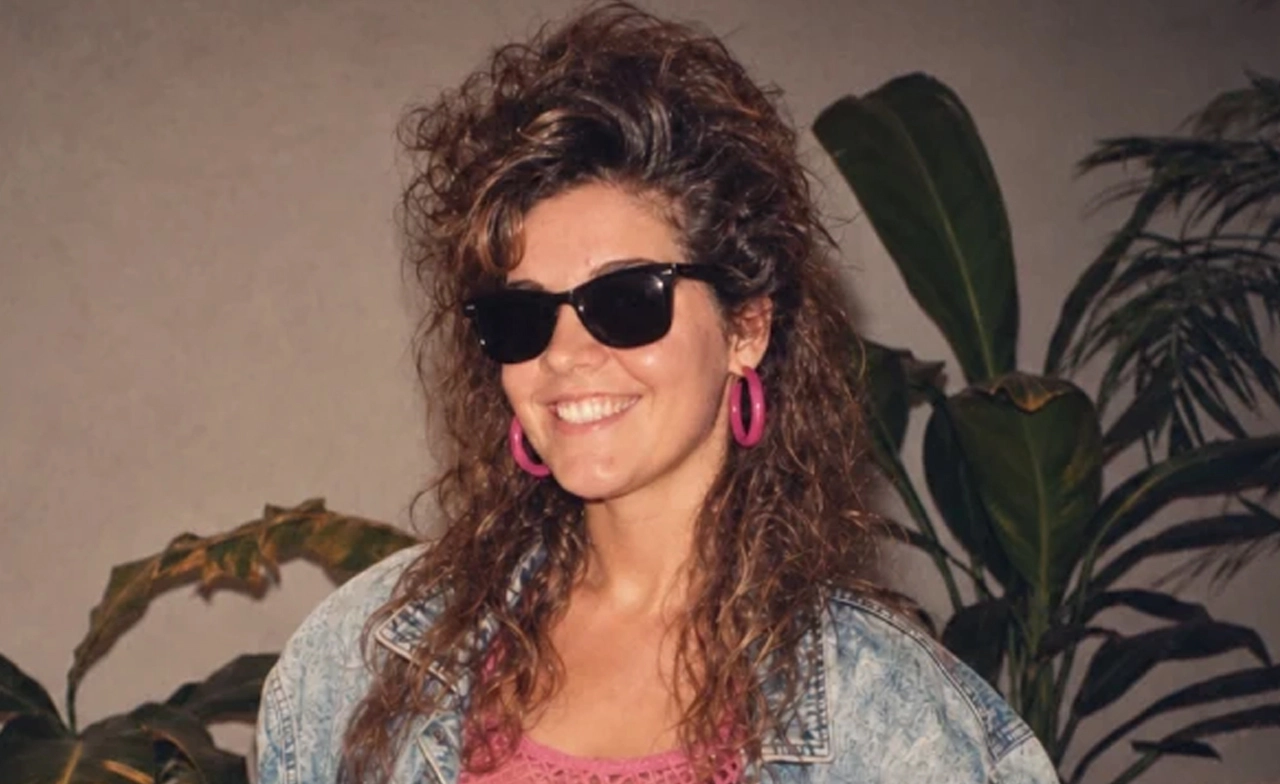
วิธีทำรูปสไตล์ยุค 80s ยุคนั้นเรามีหน้าตาอย่างไร? หลังเป็นกระแสภาพ AI บนโลกออนไลน์
เริ่มจาก ChatGPT
วิธีแรก เปิดหน้าเว็บไซต์ ChatGPT หรือแอปพลิเคชัน
1. อัปโหลดรูป
2. ใส่คำสั่ง Prompt นี้
Using my uploaded photo, show me what I would have looked like around 1985. Preserve my identity, facial features, skin tone, age, and recognizable appearance. Reimagine my hair, clothing, accessories, and surroundings with bold, unmistakably mid-1980s styling—expressive silhouettes, statement accessories, layered details, distinctive colors, and textures. Make it feel like a genuine 1985 photograph with analog grain, faded color, direct flash, and subtle softness. Add a period-accurate 1980s red-orange date stamp in the lower corner. No modern objects or text.
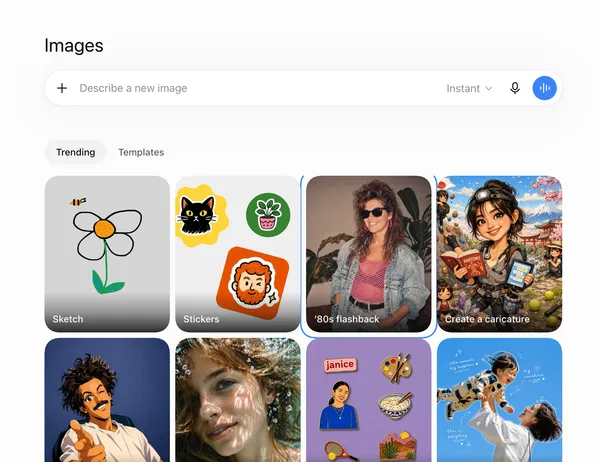
หรือคลิปที่เมนู Images และเลือกรูปภาพตัวอย่างที่เขียนว่า '80s flashback ระบบก็จะสร้างคำสั่ง Prompt ให้อัตโนมัติ
ถ้าผลยังไม่ถูกใจ สั่งต่อในแชทเดิมได้ เช่น ให้ผมฟูขึ้น เอาแว่นออก หรือเอาของยุคใหม่ออกจากพื้นหลัง
สรุปข่าว
วิธีทำรูปสไตล์ยุค 80s ยุคนั้นเรามีหน้าตาอย่างไร? หลังเป็นกระแสภาพ AI บนโลกออนไลน์
เริ่มจาก ChatGPT
วิธีแรก เปิดหน้าเว็บไซต์ ChatGPT หรือแอปพลิเคชัน
1. อัปโหลดรูป
2. ใส่คำสั่ง Prompt นี้
Using my uploaded photo, show me what I would have looked like around 1985. Preserve my identity, facial features, skin tone, age, and recognizable appearance. Reimagine my hair, clothing, accessories, and surroundings with bold, unmistakably mid-1980s styling—expressive silhouettes, statement accessories, layered details, distinctive colors, and textures. Make it feel like a genuine 1985 photograph with analog grain, faded color, direct flash, and subtle softness. Add a period-accurate 1980s red-orange date stamp in the lower corner. No modern objects or text.
หรือคลิปที่เมนู Images และเลือกรูปภาพตัวอย่างที่เขียนว่า '80s flashback ระบบก็จะสร้างคำสั่ง Prompt ให้อัตโนมัติ
ถ้าผลยังไม่ถูกใจ สั่งต่อในแชทเดิมได้ เช่น ให้ผมฟูขึ้น เอาแว่นออก หรือเอาของยุคใหม่ออกจากพื้นหลัง
ไปกันต่อที่เครื่องมือบน Lemon8 Photo Studio ไม่ต้องพิมพ์ Prompt
เหมาะกับคนที่ไม่อยากเขียนภาษาอังกฤษ
1. เปิดแอป Lemon8 แล้วเข้า Photo Studio
2. กดสร้างรูปภาพใหม่
3. อัปโหลดรูปหน้าชัด
4. เลือกสไตล์ แล้วเลือก vintage photo หรือแท็บวินเทจ (ในแอปมักอยู่แท็บหลัง ๆ ไม่ใช่แท็บแรก)
5. ระบบจะปั้นรูปให้เป็นชุด ไม่ต้องพิมพ์คำสั่ง ข้อแลกคือคุมรายละเอียดได้น้อยกว่า ChatGPT และบางครั้งมีลายน้ำจนกดติดตามหรือทำตามเงื่อนไขในแอป
ใครใช้งาน Google Gemini อยู่ก็สามารถทำได้เช่นเดียวกัน
เริ่มจากเปิด gemini.google.com หรือแอป Gemini เข้าสู่ระบบด้วยบัญชี Google เริ่มแชทใหม่ อัปโหลดรูป แล้ววาง Prompt ในทำนองเดียวกัน
ตัวอย่างสั้น:
Transform this photograph into an authentic 1980s-style portrait. Keep the person’s face and identity recognisable. Give the image a vintage film-camera look, slightly faded colours, soft grain, period-appropriate clothing and natural 1980s styling. Make it look like a real photograph from the 1980s, not a modern photo with a retro filter.
ถ้าอยากได้ตราวันที่มุมรูป ให้เติมประโยคเรื่อง red-orange date stamp จาก Prompt ของ ChatGPT ลงไปด้วย
รวมไปถึงบน Meta AI ก็ทำได้เช่นเดียวกัน
เปิดแอป Meta AI หรือเว็บ meta.ai เริ่มแชทใหม่ อัปโหลดรูป แล้วใส่ Prompt
Create an authentic 1980s photograph from this image. Keep the person’s facial features recognisable and natural. Add 1980s fashion, hairstyle and styling, vintage film grain, slightly faded colours, soft flash photography and a classic old family-album feel. Avoid a modern digital-camera appearance.
ใครใช้ Grok อยู่ก็ไม่ต้องเสียใจ ขั้นตอนง่าย ๆ เหมือน AI ตัวอื่น ๆ ดังนี้เลย
เปิด grok.com หรือแอป Grok อัปโหลดรูปแล้วใช้ Prompt ชุดเดียวกับ ChatGPT ได้เลย ยังไม่มีเทมเพลตชื่อ 80s flashback ที่ยืนยันชัดแบบ ChatGPT ดังนั้นต้องวางคำสั่งเอง จุดแข็ง คือ ลองเปรียบเทียบความเหมือนใบหน้ากับเครื่องมืออื่นได้เร็ว
Using my uploaded photo, show me what I would have looked like around 1985. Preserve my identity, facial features, skin tone, age, and recognizable appearance. Reimagine my hair, clothing, accessories, and surroundings with bold, unmistakably mid-1980s styling—expressive silhouettes, statement accessories, layered details, distinctive colors, and textures. Make it feel like a genuine 1985 photograph with analog grain, faded color, direct flash, and subtle softness. Add a period-accurate 1980s red-orange date stamp in the lower corner. No modern objects or text.
เคล็ดลับให้ดูเหมือนรูปจริงปี 1985
บอกให้คงใบหน้า สีผิว อายุ อย่าให้สวยเกิน ระบุว่าเป็นรูปฟิล์มแฟลชตรง ๆ ไม่ใช่ไซเบอร์พังก์ ห้ามมือถือ หูฟังไร้สาย รถยุคใหม่ ถ้าได้มือผิดหรือหน้าเพี้ยน ให้แก้ทีละอย่างในแชทเดิม อย่าเริ่มใหม่ทุกครั้ง
อันนี้เป็นภาพ AI ไม่ใช่หลักฐานว่าเราหน้าตาแบบนี้ในปี 1985 และรูปใบหน้าที่อัปโหลดจะเข้าเซิร์ฟเวอร์ของแต่ละแอปตามนโยบายของเขา
มาถึงตรงนี้ใครลองทำภาพ AI ยุค 80 เสร็จแล้วลองแชร์กันในคอมเมนต์ใต้โพสต์นี้ได้เลยนะคะ
- วิกฤต AI นักวิจัยเตือนเสี่ยงล้างเผ่าพันธุ์มนุษย์ภายใน 3 ปี
- ทางรอดธุรกิจยุค AI ใช้เทคโนโลยีให้ทัน สร้างความไว้ใจ ฝ่าวิกฤตความขัดแย้งภูมิรัฐศาสตร์โลก
- อดีตวิศวกร “OpenAI-Anthropic” ประกาศลาออก พร้อมเตือนภัย AI พัฒนาไกลเกินควบคุม
- สำรวจอาชีพที่ตลาดยังต้องการตัวในอีก 10 ปีข้างหน้า
- “ศุภชัย” ชู 5 เสาหลักสร้างอนาคตไทย เปลี่ยนความผันผวนสู่โอกาส
